



Dickimaw Books Blog 
FlowframTk Descriptions and Tags 🔗
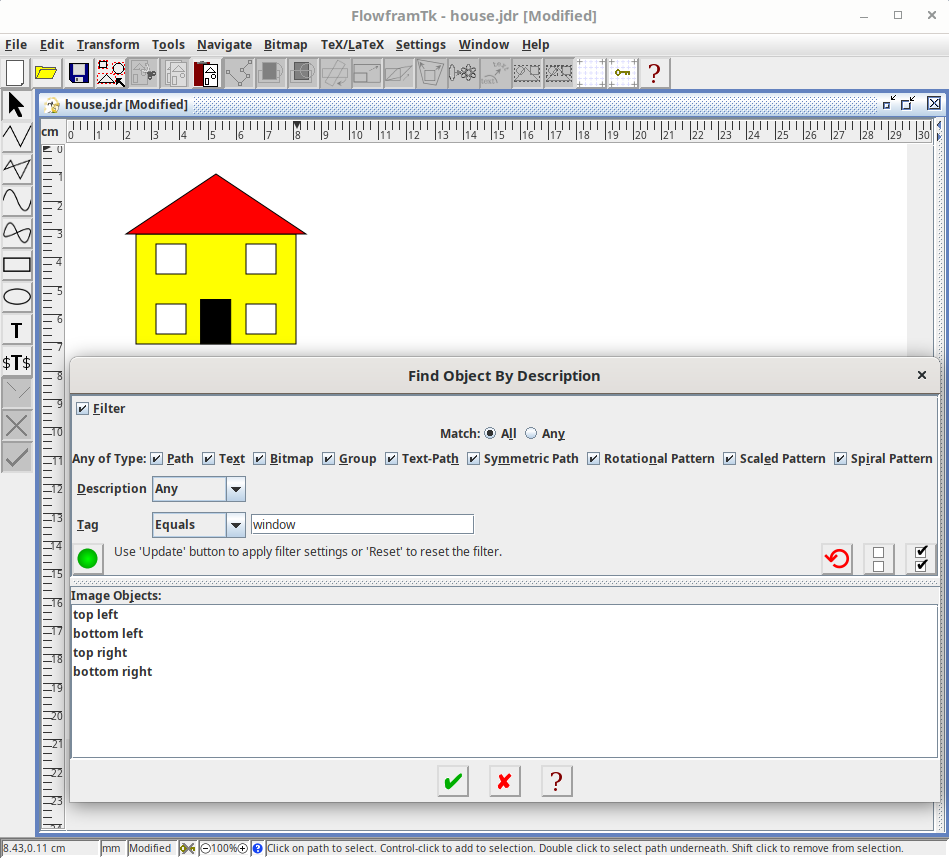
Below is an image of a house that I created in FlowframTk.
It consists of a rectangle with a black outline and yellow fill colour (the wall), a triangle with a black outline and a red fill colour (the roof), a black filled rectangle (the door), and four smaller rectangles each with a black outline and a white fill colour (the windows). These objects are all paths defined by control points. In this simple example, all paths are made up of line segments.
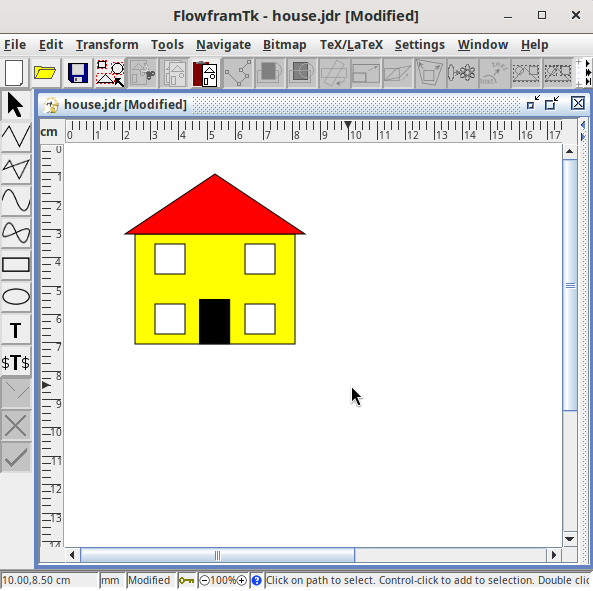
The screenshot includes the mouse cursor, which is in its default pointing arrow state. The cursor shape varies depending on the currently selected tool. The grid unit has been set to "cm" but the storage unit has been set to "mm". This means that if the image is exported to PGF code, the coordinates will be in millimetres. (The grid unit and storage unit are independent, but it’s best to choose compatible units. You would likely get rounding errors otherwise.)
Sometimes I have complicated images with a large number of small or overlapping paths and it can become difficult to select a path that needs to be edited, so I added a dialog that lists all objects that make up the image. I can then find the object I want from the list and select it that way.
The screenshot below shows the find dialog for the house image.
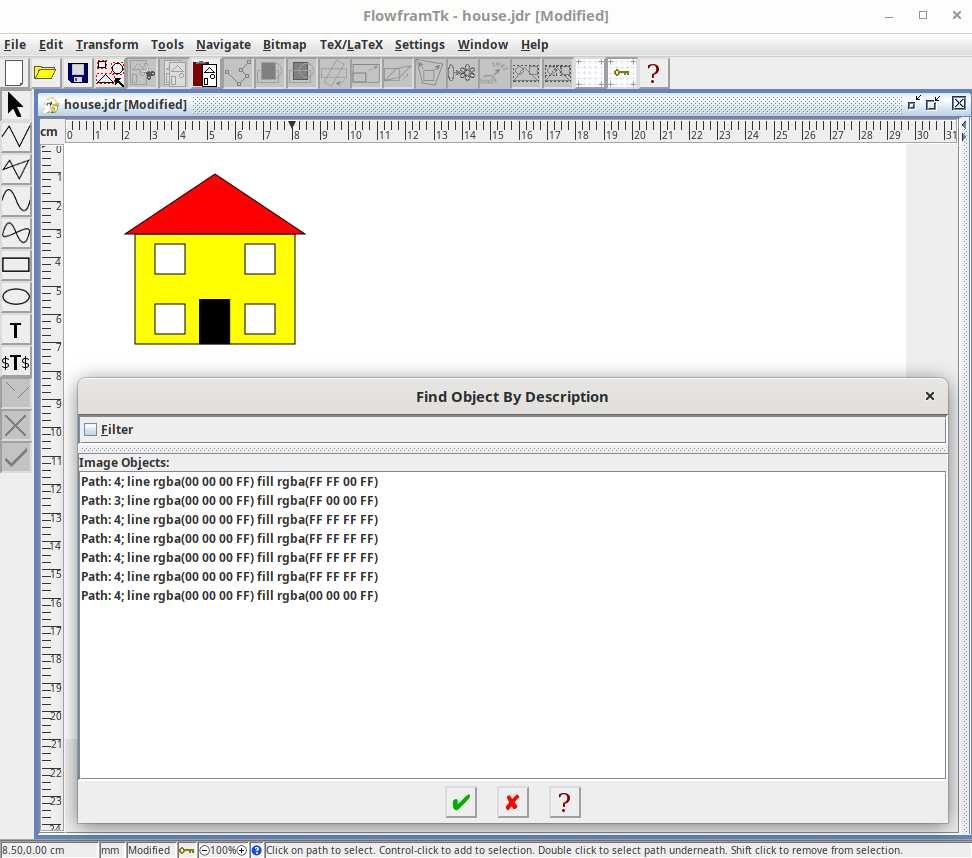
I haven’t assigned a description to any of the image objects, so a generic description is used for each one:
Path: 4; line rgba(00 00 00 FF) fill rgba(FF FF 00 FF)
Path: 3; line rgba(00 00 00 FF) fill rgba(FF 00 00 FF)
Path: 4; line rgba(00 00 00 FF) fill rgba(FF FF FF FF)
Path: 4; line rgba(00 00 00 FF) fill rgba(FF FF FF FF)
Path: 4; line rgba(00 00 00 FF) fill rgba(FF FF FF FF)
Path: 4; line rgba(00 00 00 FF) fill rgba(FF FF FF FF)
Path: 4; line rgba(00 00 00 FF) fill rgba(00 00 00 FF)
The generic description for a path simply lists the number of segments, the line paint, and the fill paint. The triangle is the path with only three segments. The other paths all have four segments. It’s not easy to distinguish between them and it’s considerably harder when the image has many paths with the same colour specifications and too many segments to count.
So each object can be assigned a description to make it easier to find in this list. In the screenshot below, I’ve selected the bottom right window and set the description to “bottom right”.
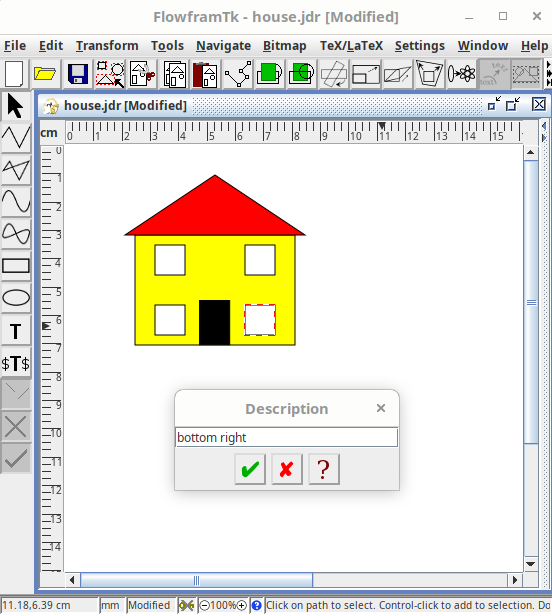
I likewise added a description to all the other objects.
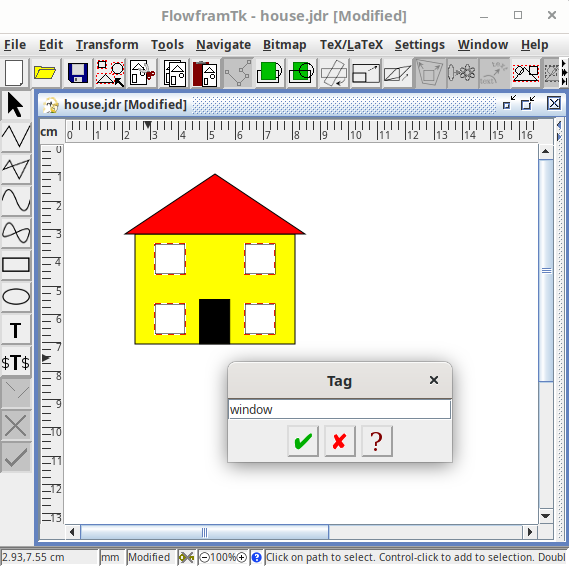
A description can only be set if a single object is selected, but it’s possible to assign a tag to multiple objects at the same time. Unlike the description, a tag is restricted to alphanumerics and a limited set of punctuation. If you want to assign multiple tags, you can use a space-separated list.
In the screenshot below, I have selected all four windows and set the tag for all of them to “window”.
Now let’s go back to the find dialog:
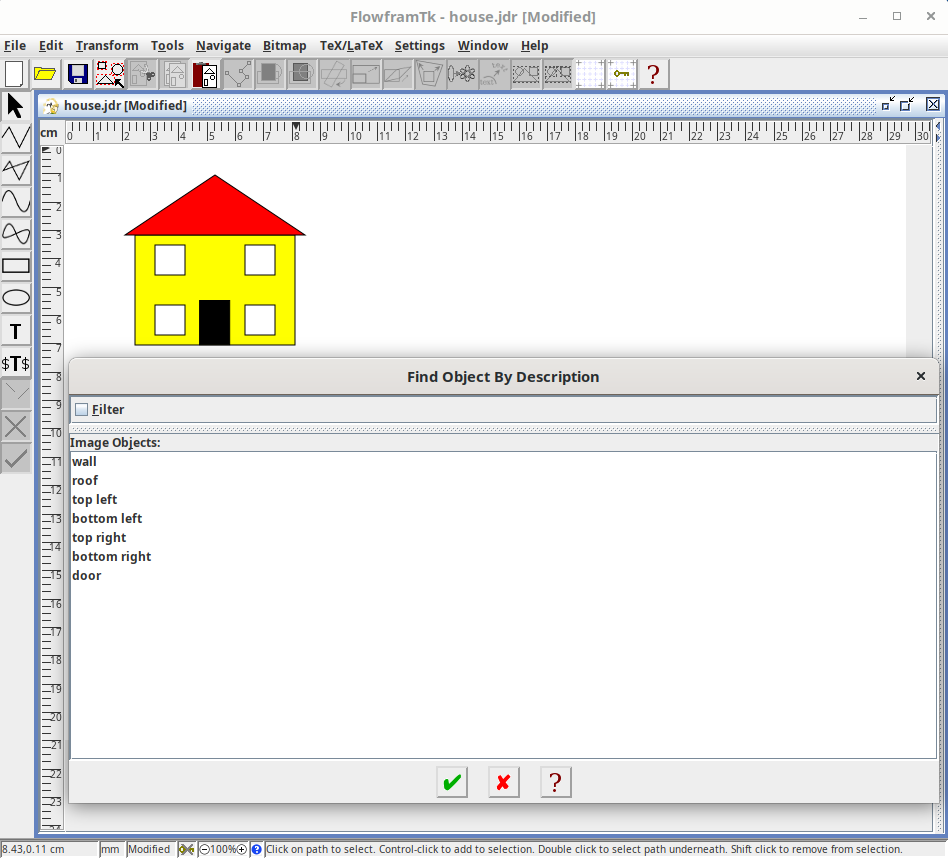
The list now shows each object’s description: wall, roof, top left, bottom left, top right, bottom right, and door. It’s now much easier to see which item corresponds to which object, but for an image with many objects it can still be a lengthy list to scroll through.
The filter setting can be used to shorten the list. In the screenshot below, I applied a filter to only show objects that have the tag set to “window”. The list now just contains the items for the four windows.
It’s also possible to assign a description to the entire image. In the screenshot below, I set the image description to “A House”.
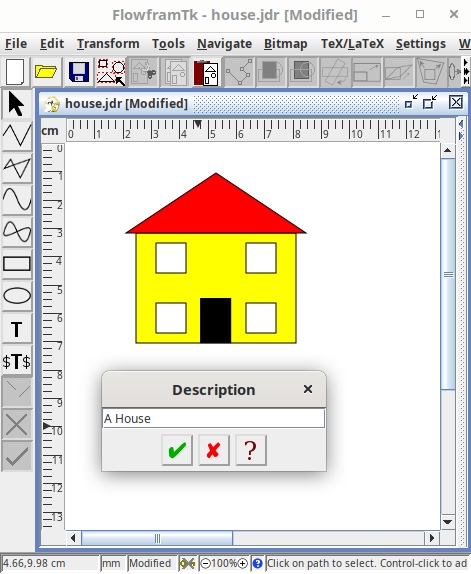
The image description isn’t used by the find dialog, but it is used by some of the export functions.
I exported the image to a file called house.tex which contains the PGF code to draw the image. Omitting the actual drawing code, the file contents are:
% Created by FlowframTk version 0.9.1
\iffalse
% This image may require the following commands in the preamble:
\usepackage{flowframtkutils}
% The normal size font is assumed to be 10pt
% End of preamble information
\fi
\begin{pgfpicture}
% A House
 PGF code to set the bounding box
% wall
 PGF path drawing code
% roof
 PGF path drawing code
% top left
 PGF path drawing code
% bottom left
 PGF path drawing code
% top right
 PGF path drawing code
% bottom right
 PGF path drawing code
% door
 PGF path drawing code
\end{pgfpicture}
Although I designed FlowframTk so that it shouldn’t be necessary to edit the exported file, if the exported image doesn’t turn out as expected, I need to look through the file to find out where the export went wrong, and it’s useful to have each object starting with its description as a comment.
The block at the start of the file indicates what you may need in your document preamble. The font information isn’t applicable as the example image doesn’t contain any text.
This example is simple enough just to include the pgf package without needing to load flowframtkutils (supplied with flowfram). So my document source code can simply be:
\documentclass{article}

\usepackage{pgf}

\begin{document}

\begin{figure}
\centering
\input{house}
\caption{An Example Image}
\end{figure}

\end{document}
More complicated images may required flowframtkutils (which automatically loads pgf). The flowframtkutils package also provides \includeteximage which may be used instead of \input. This has the advantage of using the same search path as \includegraphics (set with \graphicspath) and it has an optional argument that includes a subset of the graphicx options to apply transformations. Here’s a modified version of my document that scales the image:
\documentclass{article}

\usepackage{flowframtkutils}

\begin{document}

\begin{figure}
\centering
\includeteximage[scale=0.5]{house}
\caption{An Example Image}
\end{figure}

\end{document}
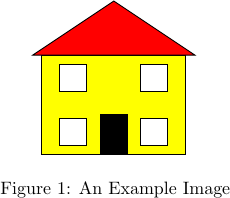
It may be that you actually want to make use of the description or tags in the document. The export dialog provides a setting that will insert code to markup each object in the exported file, but that will be the topic of another post.
Next Post
 The third edition of The Private Enemy will be available as from 31st August 2026. A crime/speculative fiction novel set in a technologically regressed future where the Anti-Technology League collide with demands to restore former levels of technology, rival gangsters battle for dominance, and government agencies are determined to reinforce their message that the world is united in peace and prosperity — by any means necessary. Into this mix comes the last of the Coulgranes of Wynherne, hell-bent on revenge.
Previous Post
 The evolution of a vector graphics application inspired by Acorn's !Draw application designed for integration with LaTeX documents, either exporting images as pgf code or exporting document classes or packages that use the flowfram package. The application was originally named JpgfDraw but was then renamed FlowframTk.
Recent Posts
The third edition of The Private Enemy will be available as from 31st August 2026. A crime/speculative fiction novel set in a technologically regressed future where the Anti-Technology League collide with demands to restore former levels of technology, rival gangsters battle for dominance, and government agencies are determined to reinforce their message that the world is united in peace and prosperity — by any means necessary. Into this mix comes the last of the Coulgranes of Wynherne, hell-bent on revenge.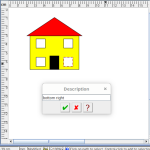 Within FlowframTk, it’s possible to assign descriptions and tags to objects to make them easier to select and find in a complicated image. This post provides an example.The evolution of a vector graphics application inspired by Acorn's !Draw application designed for integration with LaTeX documents, either exporting images as pgf code or exporting document classes or packages that use the flowfram package. The application was originally named JpgfDraw but was then renamed FlowframTk.
 There are a growing number of digital historians who are interested in documenting old computing systems from the twentieth century, but much of the information has been lost and coincident names can make it hard to search. This article is about the RISC OS ARMTeX distribution, which provided TeX and LaTeX for the ARM-powered Acorn computers in the 1990s.
 The DRM-free ebook retailer SmashWords has its annual Summer/Winter sale from 1st – 31st July 2025. My crime novel “The Private Enemy” and children’s illustrated story “The Foolish Hedgehog” both have a 50% discount, and my crime fiction short stories “I’ve Heard the Mermaid Sing”, “Unsocial Media”, “Smile for the Camera”, and “The Briefcase” have a 100% discount (i.e. free!) for the duration of the sale. Did you know that you can gift ebooks on SmashWords?
Search Blog
📂 Categories
- Autism
- Books
- Children’s Illustrated Fiction
- Illustrated fiction for young children: The Foolish Hedgehog and Quack, Quack, Quack. Give My Hat Back!
- Creative Writing
- The art of writing fiction, inspiration and themes.
- Crime Fiction
- The crime fiction category covers the crime novels The Private Enemy and The Fourth Protectorate and also the crime short stories I’ve Heard the Mermaid Sing and I’ve Heard the Mermaid Sing.
- Fiction
- Fiction books and other stories.
- Language
- Natural languages including regional dialects.
- (La)TeX
- The TeX typesetting system in general or the LaTeX format in particular.
- Music
- Norfolk
- This category is about the county of Norfolk in East Anglia (the eastern bulgy bit of England). It’s where The Private Enemy is set and is also where the author lives.
- RISC OS
- An operating system created by Acorn Computers in the late 1980s and 1990s.
- Security
- Site
- Information about the Dickimaw Books site.
- Software
- Open source software written by Nicola Talbot, which usually has some connection to (La)TeX.
- Speculative Fiction
- The speculative fiction category includes the novel The Private Enemy (set in the future), the alternative history novel The Fourth Protectorate, and the fantasy novel Muirgealia.
🔖 Tags
- Account
- Alternative History
- Sub-genre of speculative fiction, alternative history is “what if?” fiction.
- book samples
- Bots
- Conservation of Detail
- A part of the creative writing process, conservation of detail essentially means that only significant information should be added to a work of fiction.
- Cookies
- Information about the site cookies.
- Dialect
- Regional dialects, in particular the Norfolk dialect.
- Docker
- Education
- The education system.
- Ex-Cathedra
- A Norfolk-based writing group.
- Fantasy
- Sub-genre of speculative fiction involving magical elements.
- File formats
- FlowframTk
- A vector graphics application written in Java that can export to pgf picture drawing code but can also be used to construct frames for use with the flowfram package. Home page: dickimaw-books.com/software/flowframtk. (FlowframTk was originally called JpgfDraw.)
- Hippochette
- A pochette (pocket violin) with a hippo headpiece.
- History
- I’ve Heard the Mermaid Sing
- A crime fiction short story (available as an ebook) set in the late 1920s on the RMS Aquitania. See the story’s main page for further details.
- Inspirations
- The little things that inspired the author’s stories.
- Linux
- Migration
- Posts about the website migration.
- Muirgealia
- A fantasy novel. See the book’s main page for further details.
- News
- Notifications
- Online Store
- Posts about the Dickimaw Books store.
- Quack, Quack, Quack. Give My Hat Back!
- Information about the illustrated children’s book. See the book’s main page for further details.
- Re-published
- Articles that were previously published elsewhere and reproduced on this blog in order to collect them all together in one place.
- Sale
- Posts about sales that are running or are pending at the time of the post.
- Site settings
- Information about the site settings.
- Smile for the Camera
- A cybercrime short story about CCTV operator monitoring a store’s self-service tills who sees too much information.
- Story creation
- The process of creating stories.
- TeX Live
- The Briefcase
- A crime fiction short story (available as an ebook). See the story’s main page for further details.
- The Foolish Hedgehog
- Information about the illustrated children’s book. See the book’s main page for further details.
- The Fourth Protectorate
- Alternative history novel set in 1980s/90s London. See the book’s main page for further details.
- The Private Enemy
- A crime/speculative fiction novel set in a future Norfolk run by gangsters. See the book’s main page for further details.
- Unsocial Media
- A cybercrime fiction short story (available as an ebook). See the story’s main page for further details.
- World Book Day
- World Book Day (UK and Ireland) is an annual charity event held in the United Kingdom and the Republic of Ireland on the first Thursday in March. It’s a local version of the global UNESCO World Book Day.
- World Homeless Day
- World Homeless Day is marked every year on 10 October to draw attention to the needs of people experiencing homelessness.